admin
admin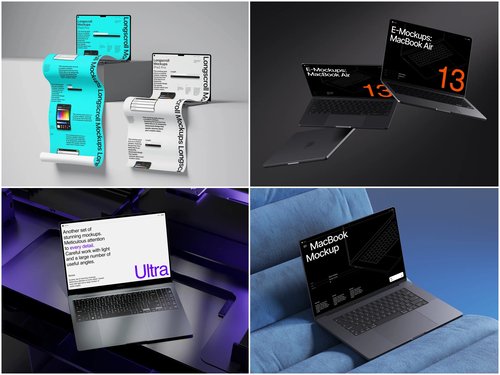
There’s a moment every serious digital buyer knows well. You’ve found a promising SaaS product, a design toolkit, or a web application. The landing page looks polished. The pitch deck sounds convincing. But before you wire money, sign an NDA, or hand over integration credentials — you want proof. Real, visual, tangible proof that this thing actually works.
That’s where the humble laptop mockup quietly becomes one of the sharpest instruments in a buyer’s evaluation toolkit.
Why Visuals Matter More Than You’d Expect in B2B Deals
Most due diligence conversations focus on financials, churn rates, and traffic analytics. But veteran digital business buyers will tell you something less obvious: how a seller presents their product visually reveals an enormous amount about their operational maturity.
A seller who drops raw screenshots into a Google Doc is telling you one story. A seller who presents their interface inside a clean, realistic laptop mockup is telling you another — they understand branding, they care about perception, and they’ve likely built a product designed for real users, not just demo environments.
Visual presentation isn’t vanity. It’s signal.
Real-World Use Cases: Mockups in the Evaluation Process
Here’s where laptop mockups move from “nice design touch” to genuine due diligence utility. In practice, buyers and brokers use them in several concrete ways:
- Marketplace listings on Flippa or Empire Flippers — Top-performing listings consistently include product screenshots embedded in device mockups. Buyers report spending longer on listings with polished visuals, which correlates with higher trust scores and fewer refund disputes.
- Demo decks before NDA signing — Before granting full dashboard access, sellers often share a mockup-enhanced deck showing core UI flows. This protects proprietary data while still communicating product depth to serious buyers.
- Investor and partner previews — When a bootstrapped SaaS founder approaches a strategic acquirer, mockup-rendered screenshots allow them to walk through the UX story without sharing live credentials or exposing backend architecture.
- White-label product validation — Agencies reselling third-party tools under their own brand use laptop mockups to present rebranded dashboards to potential clients before the actual white-label setup is complete. It’s a low-risk way to validate demand before committing to a licensing agreement.
- Competitive benchmarking presentations — M&A advisors sometimes use side-by-side mockup layouts to compare the UI maturity of two competing acquisition targets. Placing both interfaces in identical laptop frames removes hardware and environment bias, letting decision-makers focus purely on product design and feature depth.
The Psychology Behind the Mockup in Negotiations
There’s real cognitive science here. When a UI is presented floating in empty space — plain white background, no context — the brain treats it as abstract. Drop that same UI into a realistic laptop frame with natural shadows and ambient lighting, and suddenly it becomes a product people actually use.
Buyers subconsciously evaluate ease of use, visual hierarchy, and interface quality more generously when context is provided. That’s not manipulation — it’s good communication. Smart sellers understand this and use it to shorten the sales cycle without misrepresenting a single feature.
ls.graphics: Premium Mockups Built for Professional Use
When quality matters, ls.graphics is where serious designers and product teams go. Their laptop mockup collection stands out for ultra-realistic rendering that holds up even at presentation scale, with organized layered files that make customization fast and intuitive.
The library covers many different angles and perspectives, multiple color styles, and stylish minimalistic compositions that complement rather than distract from your UI. A standout feature is Edit Online — drop your screenshot in directly from the browser, no software needed. And for teams exploring before committing, there’s a generous selection of free scenes to try out first. Premium quality, zero guesswork.
What Buyers Should Look For
When you receive mockup-enhanced materials from a seller, treat them as data:
- Consistency — Does the mockup match the actual live product? Discrepancies signal trouble.
- Depth of UI shown — A single hero screen is weak. Multiple workflows suggest a mature product.
- Design coherence — A well-designed interface inside a mockup reveals whether the team invested in UX or just bolted features together.
- Rendering quality — A seller who uses low-resolution screenshots stuffed into a generic frame is cutting corners visually — and possibly elsewhere too. Crisp, properly scaled UI inside a high-fidelity mockup signals that the team sweats the details, which is exactly the kind of operator you want to buy from.
Conclusion
Due diligence has always been about reducing uncertainty. In the digital business world, where you can’t walk a factory floor or inspect physical inventory, visuals carry extraordinary weight. A well-crafted laptop mockup isn’t decoration — it’s a communication tool, a trust signal, and sometimes, a red flag detector.
The buyers who close the best deals are the ones who read every layer of a presentation, including the frame around the screenshot. And the sellers who win? They know that tools from platforms like ls.graphics aren’t an expense — they’re an investment in being taken seriously.